
Timekeeping software for the shop floor employee — enter time daily against work orders and charge codes, accurately and efficiently. AutoTime captures every labor punch and applies pre-configured rules to translate clock data into clean, compliant records.
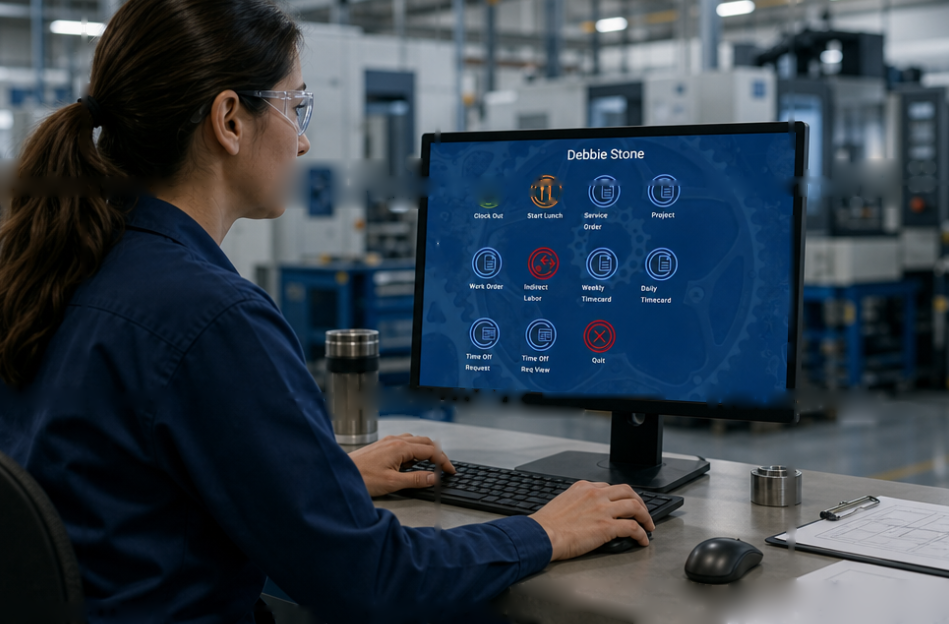
AutoTime gives shop floor employees a fast, intuitive way to record exactly where their time goes — against the projects, work orders, service orders, and internal tasks they touch each day. Whether they swipe into a job at the stride80 time clock or punch in from the desktop, every entry is captured to the second and routed to the right charge element, so the labor data is right the first time without slowing anyone down.
Behind that simple experience, AutoTime applies your pay rules, attendance policies, and overtime logic automatically — sorting regular, overtime, and unpaid time and posting attendance events as they happen. Employees see only the options relevant to their role, request time off and check balances without leaving their workstation, and never have to interpret compliance rules themselves. The result is clean, audit-ready labor data captured at the source, and a workforce that spends its time building, not bookkeeping.
Employees record time down to the second across multiple charge types, ensuring all time spent on the shop floor is tracked to the appropriate cost objective.
Configurable to support automatic postings of attendance events such as late arrivals or early departures, and to systematically post time off on the correct dates once approvals are received.
A configurable landing page for employees using the time clock, so they only see the time-entry options relevant to their daily tasks.
Configure different rules for multiple employee types based on location, shift, or classification — hourly, salaried, or contractor.
An intuitive time-entry experience that lets users charge time to projects, service orders, work orders, and internal initiatives — ensuring every relevant labor type is properly captured.
Swipe or scan into jobs from the stride80 time clock, or punch new entries from the desktop application. Integrates directly with MES and ERP systems to record punch data from external applications.
Automatically accrues PTO and leave balances based on company policy and employee-specific factors, and lets employees review balances and request time off directly from their workstation.
Employees review open overtime offerings and accept them right from the time clock. The system notifies and automatically updates employee schedules based on their responses.
Automatically generates messages when key actions occur or input is needed, and can require acknowledgement for specific actions — like an approved PTO request or a supervisor edit. Managers can also push ad-hoc messages to a user's next login.
With every entry saved, AutoTime reviews the relevant attendance and pay rules to determine the correct pay designation — regular, overtime, or unpaid — and acts on it according to local regulations or company policy.
Yes — AutoTime's rules engine lets you configure the rules needed to track overtime in accordance with US law, including state-specific rules such as California's 7th-day OT and mandatory meal-break requirements.
The stride80 supports multiple login methods, including manual badge-number entry, barcode scanning, proximity badge reading, and biometric validation.
Absolutely — AutoTime offers bi-directional integration with multiple MES systems. All of your organization's rules and pay calculations apply whether the time entries originate in AutoTime or in an outside system.
Yes — every action taken on a timecard is tracked, and changes made by authorized personnel are logged as distinct transactions with timestamps.
Trusted by 80% of the Fortune Top 20 A&D companies