
Is Your Timekeeping System Inside Your CMMC Boundary?
Ask a defense manufacturer to draw its CMMC assessment boundary and you get a confident answer: the engineering network, the ERP, the file shares where the drawings live. Ask where timekeeping sits and the confidence drains out of the room.
That hesitation is the problem. Scope is the single decision that drives the cost, length, and difficulty of a CMMC Level 2 assessment, and timekeeping is one of the systems contractors most often place on the wrong side of the line.
Scope is a CUI question, not an org-chart question
Your CMMC boundary is defined by your data, not your departments. The assessment covers every system that processes, stores, or transmits controlled unclassified information, plus the systems that provide security for those components. NIST spells this out in SP 800-171: the requirements apply to all components of your environment that touch CUI, and you can narrow the scope only by genuinely isolating the systems that don’t.
Timekeeping feels like an HR or payroll function, which is why people assume it lives outside the boundary. The data tells a different story. In a government contracting shop, a timesheet is a record of which employee charged which hours to which contract, tied directly to billing. When those hours map to programs that involve CUI, and when the timekeeping platform feeds the same ERP that holds your program data, the system is doing exactly what the rule cares about: handling and connecting to sensitive information.
The honest answer for most manufacturers is that timekeeping is either inside the boundary or close enough to it that “we assumed it wasn’t” will not survive an assessor’s questions. The connection between your timekeeping system and your ERP is itself a system interconnection that has to be documented and secured. You don’t get to ignore the road just because you only meant to protect the house.
Three control families decide whether timekeeping helps or hurts
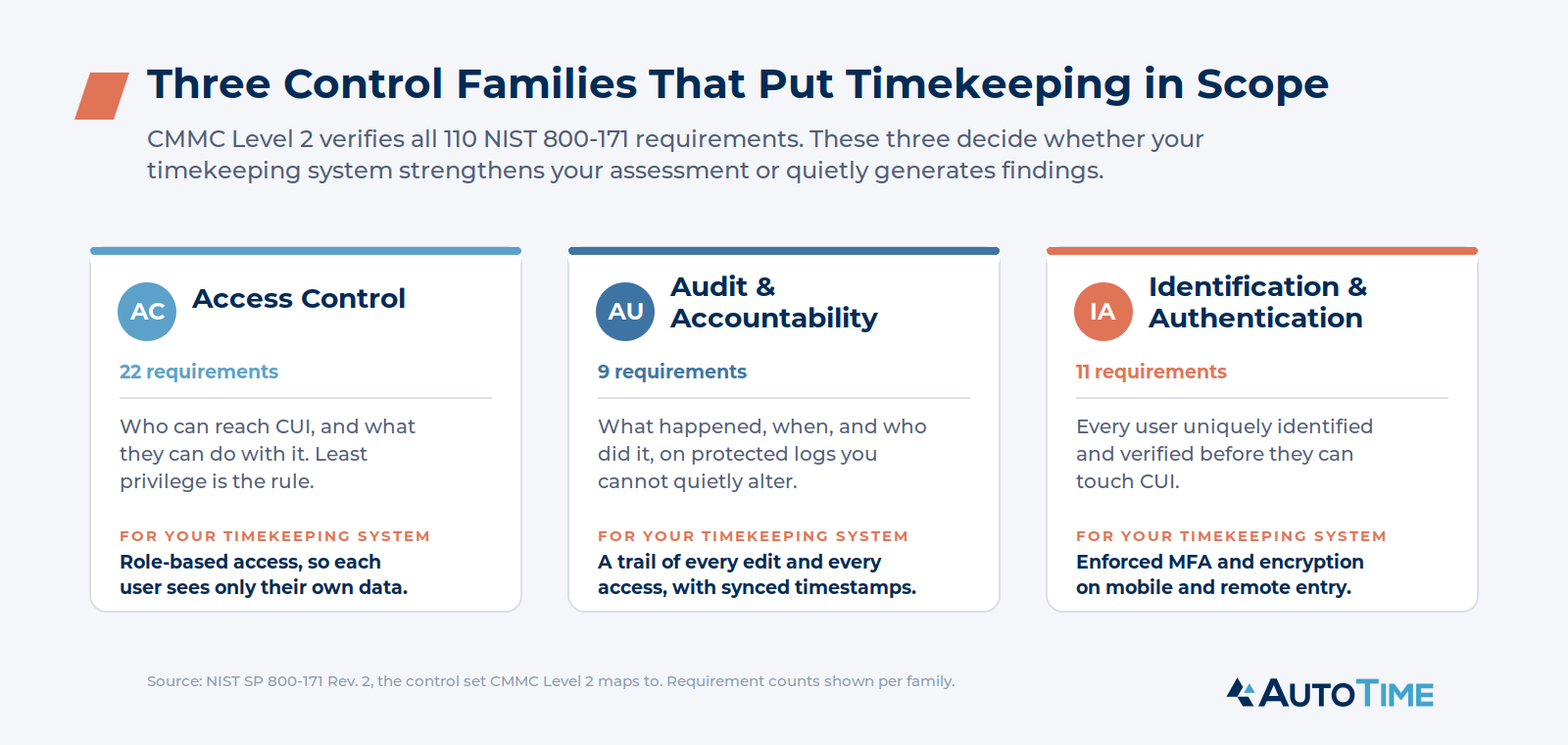
CMMC Level 2 verifies all 110 NIST 800-171 requirements across fourteen control families. Three of them land directly on any system that handles labor data tied to CUI. How your timekeeping platform handles these three is the difference between a system that strengthens your assessment and one that generates findings.
Access Control
Access Control is the largest family, with 22 requirements, and it governs who can reach CUI and what they can do with it. The principle the assessor is looking for is least privilege: people get access to exactly what their job requires and nothing more.
A timekeeping system fails this quietly when access is loose. If any manager can pull up any employee’s labor records across any contract, you have a least-privilege problem sitting in plain view. A system built for this expects role-based access as the default. Employees see their own time. Supervisors see their direct reports. Finance and payroll see what their function requires. The boundaries are enforced by the software, not by a policy nobody reads.
Audit and Accountability
The Audit and Accountability family, nine requirements, asks a deceptively simple question: what happened on this system, when, and who did it? You need records that capture security-relevant events, you need to protect those records from tampering, and you need to be able to review them.
Most timekeeping systems log edits. Far fewer log access. An assessor working the Audit and Accountability controls wants to know not only who changed a timesheet, but who viewed sensitive labor records. A platform that captures both, on a tamper-resistant trail with synchronized timestamps, hands you the evidence the control family demands. A platform that captures neither becomes a gap on your Plan of Action and Milestones.
There is a useful overlap here for government contractors. The audit trail DCAA expects on labor records, every entry and edit attributable to a person with a timestamp and a documented correction process, is the same kind of evidence the Audit and Accountability family is built around. A timekeeping system designed for DCAA scrutiny is already doing much of the work CMMC asks for.
Identification and Authentication
Identification and Authentication, eleven requirements, makes sure every user is uniquely identified and properly verified before touching CUI. The headline requirement is multi-factor authentication, and it is the control assessors flag most often when contractors set it up but fail to enforce it.
For a timekeeping platform that supports mobile and remote entry, this matters more than it might seem. Field teams and traveling employees logging time from their phones are accessing your environment from outside the building. If that access isn’t behind enforced MFA, with data encrypted in transit and at rest, you have opened a door that the assessment will find.
Where AutoTime fits
AutoTime was built for government contractors from the start, not retrofitted from a commercial workforce product, and its architecture reflects the controls above rather than working against them.
Role-based access is the default, so employees, supervisors, finance, and payroll each see only what their role requires. The audit trail captures data edits on synchronized timestamps, which is precisely what the Audit and Accountability family looks for and more than most timekeeping tools provide. Data access is controlled through aforementioned security roles. The correction workflow records reason codes and supervisor sign-off, giving you a documented, defensible change history that satisfies DCAA and the CMMC audit controls at the same time. Mobile and remote time entry runs with the encryption and access protections that Identification and Authentication and System and Communications Protection expect. AutoTime describes this as a CMMC-aligned architecture, meaning the platform is designed to support your controls when it sits inside your boundary rather than punching holes in them.
None of this certifies your organization. CMMC certification belongs to the contractor, not the software. What the right timekeeping platform does is shrink the work, because a system that already enforces least privilege, logs access and edits, and protects remote entry is contributing evidence to your assessment instead of creating gaps you have to remediate.
The scoping decision, made deliberately
Map where your CUI lives, then trace where it flows. If your labor data charges to CUI contracts or your timekeeping system connects to an ERP inside your boundary, treat timekeeping as in scope and choose a platform that can stand up to the three control families above. Run the same trace for every system that touches your data, document the connections, and you walk into the assessment with a boundary you can defend instead of one you have to explain.
A vendor’s security posture becomes your compliance risk the moment its system enters your boundary. In the final post of this series, we look at how to evaluate a timekeeping vendor as a CMMC supply chain decision, and the questions to ask before that system ever touches your CUI.